Everything InboxQL shows you is the answer to a query, and every query is something you can type. This page is the whole language. It is short, because most of its power comes from a few pieces that combine.
A query is a filter, optionally followed by stages after a |:
from:*@stripe.com after:2026-01-01 has:attachment
is:unread -from:*@acme.com | count by week
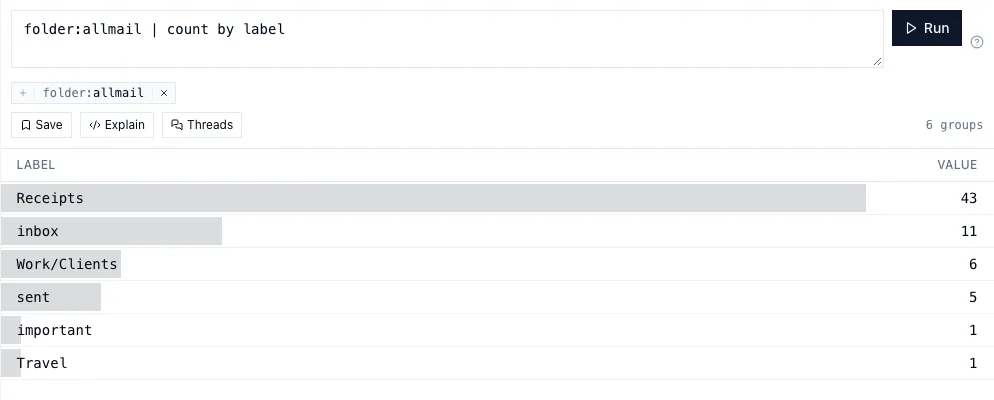
The same text works in the Desk’s query bar and on the command line, as
iql query "…".
Filters
Terms written side by side must all match. OR gives alternatives, and
parentheses group:
from:alice subject:invoice
from:alice OR from:bob
(from:alice OR from:bob) after:2026-06
People and addresses
| Term | Matches |
|---|---|
from: to: cc: bcc: |
the sender, or any recipient in that field |
anyone: |
any of them |
has:cc |
somebody was copied; -has:cc means nobody was |
from:me() is your own addresses — the ones on the accounts you set up — so
to:me() is mail sent to you and from:me() is what you sent.
from:(alice OR bob) scopes a group to one field, which saves repeating it.
Words
| Term | Matches |
|---|---|
subject: |
words in the subject |
body: |
words in the body |
| a bare word | words anywhere |
"a phrase" |
those words, together, in that order |
These match whole words: subject:invoice finds invoice, not
invoiced hidden inside another word. Use subject:*invoice* for any text
containing it.
Search is by words, not by meaning. invoice does not find billing. When it
matters, ask more than one way: subject:(invoice OR bill OR receipt).
Where mail is
| Term | Matches |
|---|---|
label: |
a label it carries: label:inbox, label:trash, label:Receipts, label:Work/* |
folder: |
inbox starred sent drafts allmail archive important spam trash all |
account: |
the InboxQL account it belongs to |
mailbox: |
the server folder it was first read from, by name |
Mail has labels, not folders, as in Gmail: the system ones — inbox,
sent, drafts, important, spam, trash — and your own. A message
carries any number. folder: names views over them: folder:inbox is
label:inbox outside Spam and Trash, folder:archive is mail not in the
inbox (outside Spam and Trash), and folder:allmail is everything but Spam and
Trash. They overlap, as labels do.
Trash and Spam stay out unless you ask
A query leaves out mail in Trash and Spam unless it mentions them, as Gmail’s
search does. from:bob is Bob’s mail you have kept; the newsletter of his
you binned, and the spam sent in his name, are not in it. That goes for
everything built on queries: counts, charts, the Dashboard, a contact card’s
figures, saved queries and annotators.
Each bin comes back when the query mentions it, and only that one:
- Trash —
folder:trash,label:trash,is:deleted - Spam —
folder:spam,label:spam,is:junk - Both —
folder:all, which is how you say “everywhere”
A mention counts anywhere in the query: inside ( … OR … ), after a -, or
in a saved: query it uses. id: names messages exactly, so a query with one
finds them wherever they are.
When a list leaves something out, the Desk says so under the query bar —
“3 more in Trash or Spam” — with Show them, which adds folder:all. A
conversation says what it holds back, too: “4 messages · 1 in Trash”.
--explain and iql query say the same.
State
| Term | Matches |
|---|---|
is: |
unread read starred answered deleted (in Trash) draft junk (in Spam) reply |
has: |
attachment file label reply |
Time and size
| Term | Matches |
|---|---|
after: before: on: |
2026-08-15, 2026-08, 2026, today, or 7d for the last seven days |
larger: smaller: |
5mb, 500kb, or a number of bytes |
Conversations
thread:<message-id> is every message in that conversation. The | thread
stage, below, expands any list to whole conversations.
Files
attached:contract is mail that carried a file named contract;
attached:*.pdf after:7d is mail with a PDF on it this week. Given eight or
more hex characters, attached: matches a file’s content fingerprint instead,
so it finds the same document whatever it was called. Files has
more.
Labels and extracted values
| Term | Matches |
|---|---|
label:purchased |
an annotator said yes |
label:purchased@0.9 |
said yes, with a score of at least 0.9 |
-label:purchased |
looked, and said no |
unlabeled:purchased |
has not looked yet |
extract:receipts |
an extractor found at least one record |
extract:receipts.amount>100 |
…with an amount over 100 |
extract:receipts.items.brand=DeWalt |
…with any item of that brand — a path through a list matches if any element does |
extract:importance.level=important |
a levelled label picked that level |
awaiting:me, awaiting:them |
the newest message of a conversation the waiting element judged to wait on you, or on them |
importance: |
important normal low ignorable — every message of a conversation the importance element judged so; nothing judged is none of them |
sentby: |
person organization system unknown — what kind of sender wrote it, as the contact records it |
label: answers for both kinds of label: the ones you, Gmail or your other
mail client put on, and the ones an annotator decides. A label of yours is
there or it is not. An annotator’s has three states, not two, and this is the
thing in the language most worth getting right. -label:x means the annotator
evaluated the message and said no. It does not include mail the
annotator has never seen — if it did, a label that had read a tenth of your
mailbox would present the other nine tenths as a negative answer. When you do
want both, ask for both: -label:x OR unlabeled:x. See Labels.
When one name is both — you made a label called purchased and an annotator
has the same name — label:purchased is either one saying yes, and
-label:purchased is neither.
Saved queries
saved:clients is everything the saved query clients matches, so it combines
with anything: saved:clients after:7d is:unread.
Three ways to match
from:acme          contains "acme" — also notacme@x.com
from:=a@acme.com   exactly this address
from:*@acme.com    a pattern; * stands for any run of characters
They are different questions, so the language keeps them apart instead of guessing which you meant.
Leaving things out
- or NOT in front of any term or group leaves out what it matches:
-from:alice
-(from:alice after:2026-01)
from:*@acme.com -to:bob@acme.com
On recipients, -to:bob means no recipient is Bob — not “some recipient is
not Bob”, which would match nearly every message with more than one recipient.
What a query is about
A query is about one kind of thing. Mail is the default; in: says otherwise:
in:mail |
messages — the default |
in:drafts |
your drafts and queued mail |
in:contacts |
the people and systems you have corresponded with |
in:attachments |
files, each one once however many times it was sent |
in:tickets |
cards on the board — archived ones only when the query says archived: |
in:events |
calendar events, one row per occurrence |
in:logs |
what InboxQL itself has been doing |
A field that only one kind has implies it: due:7d is about tickets,
origin:agent about drafts. Each kind adds its own fields — kind:system for
contacts, filetype:pdf for files, level>warn for the log — and the guides
for contacts, files and tickets list
them. Message fields still work inside them and ask about the mail behind the
thing: in:attachments from:*@acme.com is files that came from Acme.
Calendar events
in:events asks about the calendar. A row is one occurrence — a weekly
meeting is fifty-two rows a year — because that is what “what is on” and “how
many hours” are about.
| Term | Matches |
|---|---|
next: |
from now until this far ahead: next:7d, next:2w |
after: before: on: |
the occurrence’s own time, as for mail |
during: |
going on at a moment (2026-10-15T14:00) or on a day |
calendar: |
which calendar, by name |
attendee: organizer: |
who; me() is you |
status: |
your answer: accepted tentative declined needs-action organizer |
show: |
busy or free |
title: location:, a bare word |
the words |
duration> |
length in minutes |
has: |
conference attendees recurrence reminder location thread |
is: |
recurring allday private invitation proposed past upcoming |
A proposal an agent made is left out of lists and totals unless you ask for it
with is:proposed. Group events by calendar, attendee, domain,
organizer, status, title, or a time bucket, and add up their length with
| sum hours or | sum minutes:
in:events after:30d | sum hours by attendee
in:events next:14d | count by day
Stages
After a |, a stage changes what comes back. A query has at most one stage
that adds things up.
| Stage | |
|---|---|
| count |
how many |
| count by week |
how many per week — or per from, domain, label… |
| top from 10 |
the ten largest groups |
| sort date asc |
reorder |
| limit 50 |
at most 50 |
| sample 20 |
twenty at random, rather than the newest twenty |
| thread |
expand to whole conversations |
| participants |
who appears, and how often |
| sum receipts.amount by month |
add up an extracted value (also avg, min, max) |
| series receipts.amount by week |
an extracted value over time |
You can group by from, domain, to, cc, account, mailbox, label,
thread and subject; by hour, day, week, month and year; and by
any extracted value, written annotator.field — | count by receipts.merchant. A field whose name has a space in it is quoted: | count by "receipts.order number".
| count by counts messages: a message naming two merchants adds one to
each. | sum and | series add up records, because a weekly digest with
seven daily figures is seven of them.
Examples worth stealing
extract:importance.level=important after:7d | thread
is:unread to:me() -label:automated after:7d
from:me() after:90d | top to 20
in:contacts awaiting:me | sort last desc
awaiting:me | timeline
in:attachments filetype:pdf is:shared | count by from
extract:receipts after:2026 | sum receipts.amount by month
label:loops -from:me() after:30d | thread
in:logs level>warn after:1d | count by category
When a query is wrong
A query that does not parse says where: the position of the problem and what
was expected there. An unknown field suggests the nearest real one — form:
asks whether you meant from:.
On the command line, iql query "…" --explain shows the SQL a query becomes,
and iql sql runs read-only SQL for anything the language cannot say. Both are
covered in the command line.